Pinkfong Baby Shark Phone Game
- 3.4
- Rating
- 10.00M
- Installs
- Free
- Price
 Analysis by App-foxy
When I tried Pinkfong Baby Shark Phone Game, I understood its appeal almost immediately: it turns a familiar children’s character into a simple learning activity built around letters and numbers. The app sits in the education category, is made by The Pinkfong Company, and is aimed at children under the Everyone age rating. For a young child who already enjoys Pinkfong or Baby Shark, that familiarity can make the first step into early learning feel much less intimidating.
My overall impression is positive but carefully limited. This is not an all-purpose early-years curriculum, and I would not use it as a replacement for reading together, counting physical objects, drawing, or talking with a child. I see it more as a short, cheerful activity for moments when a child wants something interactive. It is free to install, which makes trying it easy, although in-app purchases range from $4.99 to $107.88 per item, so I would check the purchase settings before handing over the phone.
How the current version feels in everyday use
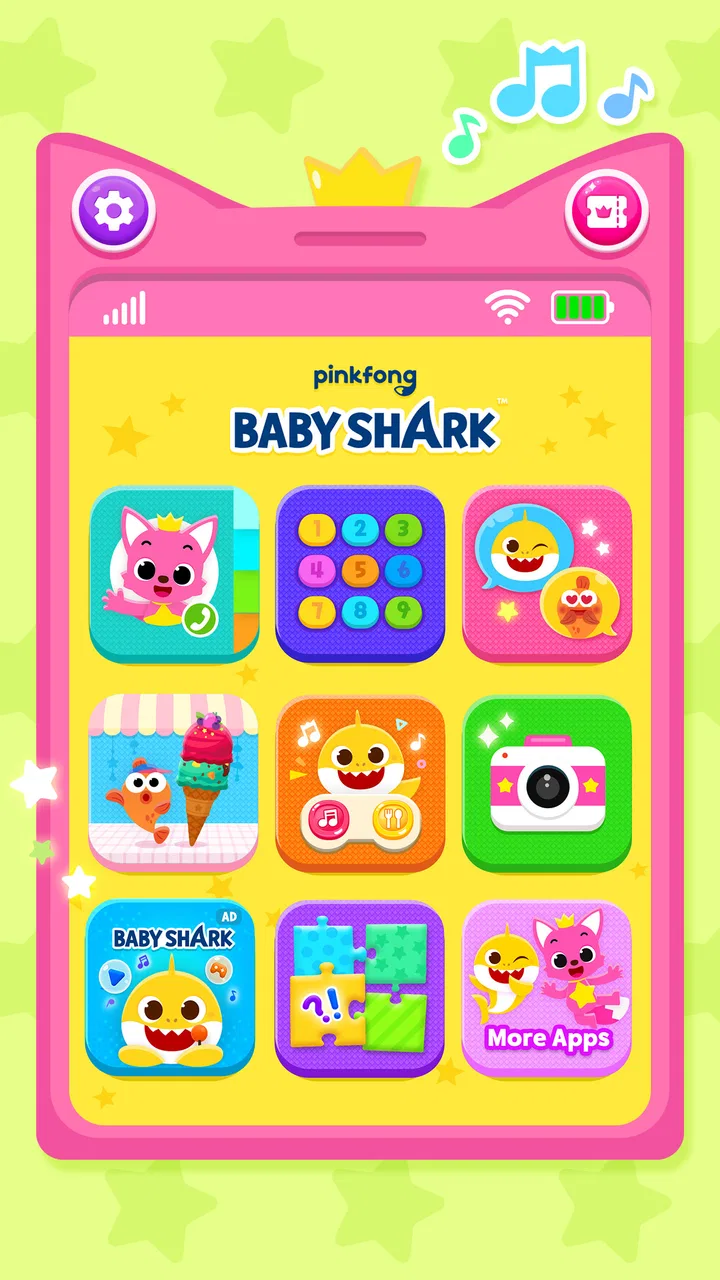
The central idea is straightforward: children interact with a phone-style game while meeting basic ABC and 123 content alongside Pinkfong and Baby Shark. That simplicity is one of its strongest qualities. A preschool child does not need to understand a complicated menu system or a long set of rules before beginning. The recognizable theme gives the activity an immediate sense of play, while the educational purpose remains visible.
You May Also Like

 Blood Strike: 2.5 Anniversary
Blood Strike’s Loadouts Turn Every Drop Into a Tactical Gamble
A close look at Blood Strike’s custom loadouts: how fast access to signature weapons reshapes its battle royale rhythm, rewards preparation, and narrows the gap between fights.

 Pandora - Music & Podcasts
Pandora’s Music Is Easy to Start, but Harder to Recover
Pandora’s strength is its low-effort path from a seed to a station. Its weak spot is how much confidence it asks you to place in connection, setup, and quiet recovery.

 8 Ball Pool
 Is Built on Rivalries, Rematches, and Routine
A close look at the rivalries, rematches, shared routines, and unanswered safety questions that turn a quick pool match into a persistent mobile community.

 Samsung Music
’s Quiet Strength Is Playing What You Already Own
Its reach comes less from spectacle than from dependable access to a personal library. That simplicity is both the app’s strongest retention engine and its ceiling.

 AccuWeather: Weather Radar
AccuWeather Review: A Quick, Clear Forecast for Everyday Decisions
For everyday plans, the best forecast is the one you can understand quickly. AccuWeather makes rain timing, radar, and local conditions easy to act on, with a few trade-offs.

 Hill Climb Racing
Why Hill Climb Racing Still Turns Crashes Into One More Run
A tiny car, a bumpy hill and one more upgrade: Hill Climb Racing keeps resurfacing because its simple chaos makes every near-miss feel personal.
More From Our News Desk



I would introduce it during a short waiting period, such as before an appointment or while a parent is preparing dinner. In that situation, the app can provide a focused activity without asking the child to manage a difficult game. I would first sit beside the child, watch how they move through the opening screens, and show them where to return if they become stuck. After that, I would let the child explore while staying close enough to turn the experience into a conversation.
That last point matters. The learning value is stronger when the phone activity continues away from the screen. If a child encounters a letter, I might ask them to find the same letter on a cereal box. If the app presents numbers, I might follow up by counting spoons, toy blocks, or steps across the room. Used this way, the game becomes a prompt for real-world practice instead of a passive distraction.
The interface is best suited to children who respond to sound, movement, and familiar characters. A child who is already interested in Baby Shark may be more willing to repeat an activity than they would be with a plain alphabet worksheet. On the other hand, children who prefer quiet, book-like learning may find the character-led presentation too busy or repetitive. I would judge that after a few short sessions rather than assuming the famous theme will work for everyone.
One practical strength is its low barrier to entry. The app is free, carries an Everyone rating, and supports devices running Android 9 or later. It has also reached over ten million installs, which suggests that this style of character-based learning has broad appeal. Its average rating is 3.4, though, so I would treat popularity as evidence of reach rather than proof that every family will enjoy the experience.
What the ABC and number focus does well
The app’s subject matter is deliberately narrow: early exposure to letters and numbers. That narrowness helps a young learner understand what kind of activity they are entering. Parents looking for a first introduction to the alphabet or basic counting may appreciate not having to navigate unrelated subjects such as science, geography, or advanced reading exercises.
I found the strongest use case to be repetition. Young children often need to see and hear the same material many times, and a playful phone activity can make that repetition more tolerable. The key is to keep sessions short enough that the child still wants to return. I would avoid leaving it running in the background for a long stretch, because extended exposure does not automatically mean better learning.
It is also useful as a confidence-building tool. A child who is not ready for handwriting practice can still begin recognizing symbols and associating them with spoken language. That does not mean the app teaches writing by itself, but it may help make letters feel familiar before a child starts tracing them with a pencil.
Parents should add the missing physical step. After a session, I would ask the child to say a letter, point to it, and then draw it in the air or on paper. For numbers, I would ask the child to count actual objects rather than only repeat what appeared on the screen. This simple routine turns a digital recognition exercise into a more complete learning moment.
Why the phone-game format is both useful and limiting
The phone presentation makes the app approachable, but it also shapes the child’s expectations. A child may focus more on the character, sounds, or reward of touching the screen than on the letter or number itself. I would therefore watch for whether the child can identify the material after the character is removed from the immediate context. If they cannot, the app is functioning mainly as entertainment for that child at that moment.
Another trade-off is convenience versus supervision. A phone is easy to carry, but it is also easy for a child to tap into areas they do not understand. Because purchases are available, I would use the device’s purchase protections and avoid treating the app as an unsupervised toy. I would also explain to the child that tapping a colorful button is not the same as asking permission to buy something.
The small screen can be another issue for younger children. If a child has difficulty seeing or accurately touching elements, the activity may become frustrating rather than educational. In that case, a larger tablet, a physical alphabet set, or a parent-led game with household objects may be a better choice. The app’s presence on a phone does not make every phone equally comfortable for every child.
What has changed and what that means for families
The current version is 30.33, and the app was released on June 8, 2016. That history tells me this is an established product rather than a brand-new experiment. A long-running children’s app can benefit from accumulated refinement, but I would not assume that age alone makes it the best current option. What matters to a family is whether the present experience remains easy to use, engaging, and appropriate for the child in front of them.
From a reviewer’s perspective, the version number is useful mainly as a checkpoint. If a parent has used an earlier release, the current build is the one worth evaluating before deciding whether to return. I would pay attention to whether familiar activities still open smoothly, whether the child can understand the navigation without constant help, and whether the app remains comfortable on the family’s device. Those are more meaningful questions than simply seeing a larger version number.
I also separate confirmed product facts from expectations about future development. The app’s established ABC-and-123 identity gives it a clear foundation, but I would not promise that future updates will add a particular lesson type, change the purchase model, or introduce a new learning system. Families choosing it today should judge the version available now, not a hoped-for redesign.
For existing users, the biggest effect of staying current is practical rather than dramatic. A newer build may be preferable when an older installation feels awkward or when a child is starting fresh on another device. I would let the child test the current experience with a parent nearby instead of assuming that previous familiarity guarantees a smooth transition. Children notice small changes in buttons, pacing, and presentation even when adults consider them minor.
There is also a useful decision point for families who installed it years ago and now want more advanced learning. A child may simply have outgrown the app. If they can already recognize the alphabet and count comfortably, repeating introductory activities may offer little challenge. At that stage, I would move toward an app or activity that supports phonics, handwriting, simple words, or more meaningful problem-solving, while keeping this one only if the child still enjoys it as a light review.
How it compares with ordinary alternatives
Compared with a printed alphabet book, the app is more responsive and likely to feel more exciting to a child who wants to tap and hear feedback. A book is calmer, easier to share with two people at once, and better for pointing, discussing pictures, and building a bedtime routine. I would choose the app for a quick interactive break and the book when I want slower conversation and less screen stimulation.
Compared with physical flashcards, the app offers a more polished character setting, while cards make it easier to test whether a child remembers a letter without relying on an animation or familiar song. Flashcards are also flexible: I can mix letters, hide the pictures, or ask the child to sort them. The phone game is more inviting for independent tapping, but physical cards provide better control over the lesson.
Compared with a broad educational platform, this app is easier for a young child to understand because its purpose is narrower. A larger platform may offer stronger progression across reading, math, creativity, and problem-solving, but it can also overwhelm a preschooler with choices. I would pick Pinkfong’s game when the goal is a friendly first encounter with ABC and 123 material, not when I need a complete learning plan.
The Baby Shark connection is a genuine advantage for fans and a genuine weakness for children who do not care about the character. Familiar branding can open the door to participation, but it should not be confused with instructional depth. I would let the child’s response decide: if the character helps them stay attentive, it is useful; if the character becomes the only thing they remember, I would switch to a quieter or more direct teaching method.
Small strategies that make the app more effective
My first recommendation is to use a “screen, then object” routine. After a short activity, I would place three or four real objects nearby and ask the child to count them, then add or remove one and count again. This reveals whether the number practice transfers beyond the display. It also prevents the phone from becoming the only place where counting happens.
My second recommendation is to pause instead of answering too quickly. If the child hesitates over a letter, I would give them time to look and respond before touching the answer myself. Then I would connect it to a familiar word, such as the child’s name or an object in the room. The app supplies the prompt, but the parent supplies the personal connection that makes the symbol meaningful.
A third useful approach is to treat the app as a diagnostic clue. If a child repeatedly avoids a particular letter or number, I would not assume they are being careless. The issue might be visual confusion, difficulty hearing the sound, or simple fatigue. I would note the pattern and practice it later with paper, magnets, or spoken games. That gives the parent information the app alone cannot interpret.
I would also keep the purchase boundary visible to adults. Since the free entry point sits alongside paid items, I would explore the available content myself before allowing independent use. I would not promise a child that every activity is available without payment, and I would avoid making a purchase simply because the child is asking during an excited moment. A calm decision made by the adult is better than a rushed one made under pressure.
Where the experience still falls short
The most important limitation is scope. ABC and 123 exposure is a beginning, not a full early-literacy or early-math program. The app cannot replace conversation, storytelling, handwriting practice, manipulatives, or observation of how a child thinks. I would be especially cautious about using it as the only educational activity for a child who needs structured progress.
The free-to-start model may also create uncertainty for parents who want a completely open experience without purchase prompts. The listed purchase range is wide enough that I would review the options before deciding whether the app fits the family budget. A parent who dislikes character-based add-ons or prefers one predictable payment may find a book, a subscription-free tool, or household activities easier to manage.
There is a further issue of attention. A child may enjoy returning to familiar material, but enjoyment can hide a lack of progression. I would occasionally ask the child to demonstrate the same letter or number away from the app. If performance does not carry over, I would reduce screen time and add hands-on practice rather than assuming more repetition inside the game will solve everything.
I would skip this app for a child who becomes overstimulated by animated character content, for a family seeking advanced reading instruction, or for anyone who wants a fully offline learning routine. I would also choose another option if the device is old enough that the required Android version is not supported. In those cases, a physical activity or a different educational app is likely to be a better fit.
Who should try it now
I think it is worth trying for a preschool-aged child who recognizes Pinkfong or Baby Shark, enjoys short touch-based activities, and is beginning to encounter letters and numbers. The free price makes an initial trial approachable, and the Everyone rating keeps the intended audience broad. I would still stay involved, particularly during the first sessions and whenever a purchase-related screen appears.
I would recommend it less strongly to parents who want measurable progression, detailed customization, or a complete sequence from letter recognition through reading. Those families should compare it with broader educational tools and judge whether a character-led game provides enough challenge. The app works best as one small part of a child’s routine, not as the routine itself.
Its large install base shows that the concept has reached many families, while the 3.4 average rating reminds me to keep expectations realistic. This is an accessible, themed learning game with a clear introductory purpose. It is not a guarantee of academic progress, and it will not suit every child’s temperament or every parent’s approach to screen use.
My recommendation and what I would watch next
I would keep Pinkfong Baby Shark Phone Game on the shortlist for a young child who needs a friendly bridge into ABC and 123 practice. I like its recognizable theme, simple starting point, and usefulness in short everyday situations. I would pair it with books, real objects, drawing, and conversation, then reassess after a few sessions based on what the child can do away from the screen.
When considering future use, I would watch three things: whether the current version remains easy for children to navigate, whether the educational activities continue to feel meaningful rather than merely repetitive, and whether the in-app purchase experience stays comfortable for families. Those are the areas most likely to affect long-term value.
My honest verdict: this is a pleasant introductory education app for the right child, especially one motivated by Pinkfong and Baby Shark. I would recommend trying it as a supervised, short-session activity, but I would not rely on it alone. If your child needs calm shared learning, choose books and physical games more often; if they need advanced skills, look elsewhere. For a quick, familiar first step into letters and numbers, however, it earns a place in the rotation.
FAQs for Pinkfong Baby Shark Phone Game
01What is the Pinkfong Baby Shark Phone Game about?
The Pinkfong Baby Shark Phone Game is an interactive app designed for young children. It features the globally popular "Baby Shark" song and includes various games and activities that encourage learning through music and play. The app aims to enhance children's creativity, memory, and motor skills in an engaging, child-friendly environment.
02Is the Pinkfong Baby Shark Phone Game safe for children?
Yes, the Pinkfong Baby Shark Phone Game is specifically designed with children in mind. The app adheres to strict safety and privacy standards, ensuring a secure experience for young users. Parents can feel confident knowing that the content is age-appropriate and free from harmful ads or in-app purchases that could disrupt the child's experience.
03What age group is the Pinkfong Baby Shark Phone Game suitable for?
The game is tailored for preschoolers, typically ranging from ages 2 to 5. It offers simple controls and colorful graphics that are easy for young children to understand and interact with. The app aims to provide educational value through fun activities, making it an excellent choice for early childhood development.
04Does the Pinkfong Baby Shark Phone Game require an internet connection?
The app can be used without an internet connection once it is fully downloaded. This allows children to enjoy the games and activities anytime, anywhere, without the need for Wi-Fi or mobile data. However, initial downloading and updates may require an internet connection to ensure the latest features are available.
05Are there any costs associated with the Pinkfong Baby Shark Phone Game?
The Pinkfong Baby Shark Phone Game is available as a free download, but it may offer optional in-app purchases. These purchases can enhance the experience by unlocking additional content or features. Parents can manage these options through settings to prevent unintended purchases and ensure a controlled spending environment for their kids.
Pros
- Engaging and colorful graphics.
- Simple controls for young kids.
- Educational mini-games included.
- Popular Baby Shark characters.
- No in-app purchases required.
Cons
- Limited content after initial play.
- Repetitive music might annoy parents.
- Requires internet for updates.
- Ads can be distracting.
- Limited appeal for older kids.

Pinkfong Baby Shark Phone Game
Gallery